SQL Queries
SQL order of execution
Section titled “SQL order of execution”SQL is written top to bottom, but the engine does not run clauses in that order.
| Step | Clause | What happens |
|---|---|---|
| 1 | FROM / JOIN | Load tables and combine rows |
| 2 | WHERE | Filter individual rows |
| 3 | GROUP BY | Build groups for aggregation |
| 4 | HAVING | Filter groups after aggregation |
| 5 | SELECT | Project columns and expressions |
| 6 | DISTINCT | Remove duplicate result rows |
| 7 | ORDER BY | Sort the final result set |
| 8 | LIMIT / OFFSET | Return a slice of rows |
Example — the engine processes this query in the order above, not as written:
SELECT branchName, COUNT(*) AS employeeCountFROM EmployeesWHERE status = 'Active'GROUP BY branchNameHAVING COUNT(*) > 2ORDER BY employeeCount DESCLIMIT 5;WHERE runs before grouping (row filter); HAVING runs after (group filter); ORDER BY and LIMIT run last.
Basic SELECT
Section titled “Basic SELECT”Retrieve data from one or more tables. Request every column or only the ones you need.
All columns
Section titled “All columns”SELECT * returns every field in the table.
SELECT *FROM Clients;Specific columns
Section titled “Specific columns”List only the fields you want in the result set.
SELECT clientName, clientSurnameFROM Clients;DISTINCT
Section titled “DISTINCT”Removes duplicate rows and returns only unique values for the given column.
SELECT DISTINCT (branchName)FROM Employees;Filtering with WHERE
Section titled “Filtering with WHERE”Restrict results with conditions. Combine them using AND, OR, IN, and BETWEEN.
Simple filter
Section titled “Simple filter”SELECT employeeName, employeeSurnameFROM EmployeesWHERE branchName = 'Downtown';Combined operators
Section titled “Combined operators”SELECT accountNumber, balanceFROM AccountsWHERE branchName = 'Random'AND balance > 1000OR balancebalance IN ('1000', '2000')balance BETWEEN 2000 AND 5000;Pattern matching with LIKE
Section titled “Pattern matching with LIKE”Filter by text patterns. % matches any sequence of characters.
SELECT *FROM ClientsWHERE address LIKE '%Frigate%';Pattern matching with REGEXP
Section titled “Pattern matching with REGEXP”Match text using regular expressions. More powerful than LIKE for complex patterns (digit sequences, alternation, anchors). Syntax varies by engine: MySQL uses REGEXP / RLIKE; PostgreSQL uses ~ and ~*; SQL Server uses LIKE with limited wildcards or CLR/functions for full regex.
Basic match
Section titled “Basic match”Find rows where a column matches a regex pattern.
SELECT *FROM ClientsWHERE clientName REGEXP '^John';^ anchors the match to the start of the string.
Common patterns
Section titled “Common patterns”| Pattern | Meaning |
|---|---|
^John | Starts with “John” |
son$ | Ends with “son” |
[0-9]+ | One or more digits |
| `John | Jane` |
^.{5}$ | Exactly 5 characters |
SELECT accountNumber, balanceFROM AccountsWHERE CAST(accountNumber AS CHAR) REGEXP '^10[0-9]{2}$';Case sensitivity
Section titled “Case sensitivity”In MySQL, REGEXP is case-insensitive by default for non-binary strings. Use REGEXP BINARY or RLIKE BINARY for case-sensitive matching.
SELECT *FROM EmployeesWHERE employeeName REGEXP BINARY '^Smith';Sorting with ORDER BY
Section titled “Sorting with ORDER BY”Sort rows by one or more columns. DESC reverses the order (highest to lowest).
SELECT *FROM AccountsORDER BY branchName, balance DESC;LIMIT and OFFSET
Section titled “LIMIT and OFFSET”Paginate results: LIMIT sets how many rows to return; OFFSET skips rows from the start.
SELECT *FROM BranchesORDER BY active DESC;LIMIT 3 OFFSET 2;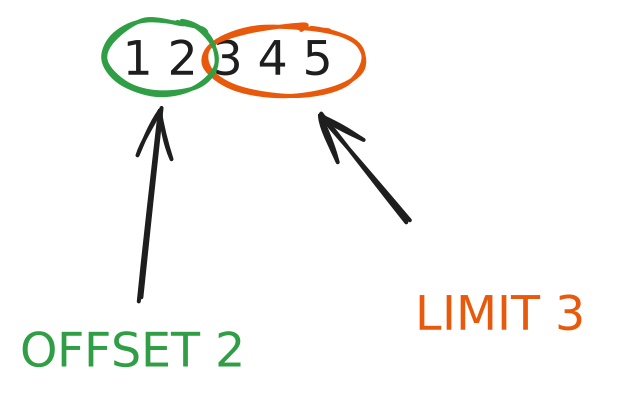
Table joins
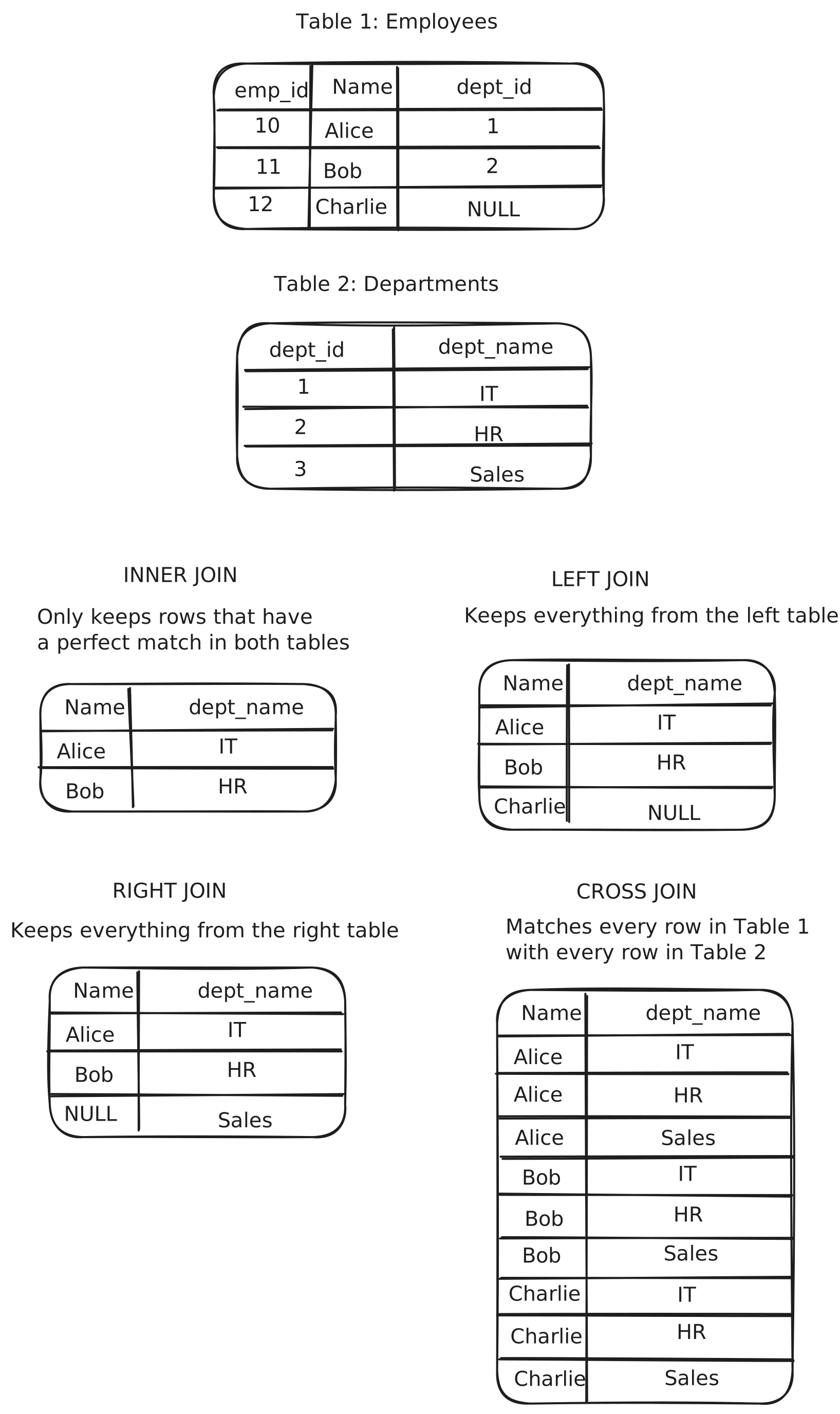
Section titled “Table joins”Combine rows from two or more tables on a shared condition, usually a foreign key.
INNER JOIN
Section titled “INNER JOIN”Only rows that match in both tables.
SELECT Employees.name, Departments.dept_nameFROM EmployeesINNER JOIN Departments ON Employees.dept_id = Departments.dept_id;LEFT JOIN
Section titled “LEFT JOIN”All rows from the left table; unmatched right-side fields are NULL.
SELECT Employees.name, Departments.dept_nameFROM EmployeesLEFT JOIN Departments ON Employees.dept_id = Departments.dept_id;RIGHT JOIN
Section titled “RIGHT JOIN”All rows from the right table; the left side fills with NULL when there is no match.
SELECT Employees.name, Departments.dept_nameFROM EmployeesRIGHT JOIN Departments ON Employees.dept_id = Departments.dept_id;CROSS JOIN
Section titled “CROSS JOIN”Cartesian product: every row from the first table paired with every row from the second.
SELECT Employees.name, Departments.dept_nameFROM EmployeesCROSS JOIN Departments;BETWEEN in JOIN
Section titled “BETWEEN in JOIN”Use BETWEEN in the ON clause when the match is a range instead of equality — e.g. a value must fall between two columns in the other table. Both bounds are inclusive, same as BETWEEN in WHERE.
SELECT e.employeeName, e.salary, b.bandLabelFROM Employees e INNER JOIN SalaryBands b ON e.salary BETWEEN b.minSalary AND b.maxSalary;Common use cases: salary or price tiers, date ranges (event falls within a promotion period), version intervals. Prefer indexed range columns on the right table for performance on large datasets.
Table aliases
Section titled “Table aliases”Short names for tables or columns. Keeps multi-table queries readable and lets you rename computed values in the result.
SELECT Accounts.*, balance * 1.08 AS balanceInDollarsFROM Accounts;UNION operator
Section titled “UNION operator”Stack result sets from two or more queries into one. UNION removes duplicates; UNION ALL keeps them.
SELECT employee_email FROM sales_departmentUNIONSELECT employee_email FROM marketing_department;Subquery in the WHERE clause
Section titled “Subquery in the WHERE clause”Filter rows using a nested query. The inner query runs first and its result is used as a condition for the outer query.
SELECT employeeNameFROM EmployeesWHERE branchName IN ( SELECT branchName FROM Employees WHERE employeeName = 'Smith');Subquery in the FROM clause
Section titled “Subquery in the FROM clause”Treat a nested query as a temporary table (derived table). Must be aliased before joining or selecting from it.
SELECT employeeNameFROM (SELECT branchName FROM Employees WHERE employeeName = 'Smith') AS SmithBranch INNER JOIN Employees ON Employees.branchName = SmithBranch.branchName;Subquery in the SELECT clause
Section titled “Subquery in the SELECT clause”Compute a scalar value per row in the outer query. Often used for aggregates tied to the current row.
SELECT clientName, ( SELECT Ac.accountNumber FROM Accounts Ac INNER JOIN ClientAccounts CA ON Ac.accountNumber = CA.accountNumber WHERE Clients.clientId = CA.clientId ORDER BY balance DESC LIMIT 1)FROM Clients;Common Table Expressions (CTE)
Section titled “Common Table Expressions (CTE)”Name a subquery with WITH and reference it like a temporary view. Improves readability in complex, multi-step queries.
WITH high_balance_accounts AS ( SELECT accountNumber, balance FROM Accounts WHERE balance > 1000)SELECT *FROM high_balance_accountsWHERE balance > 5000;EXISTS, ALL, and ANY
Section titled “EXISTS, ALL, and ANY”Comparison operators that work with subqueries. EXISTS checks for matching rows; ALL and ANY compare a value against every or at least one value from the subquery.
EXISTS
Section titled “EXISTS”Returns rows from the outer query when the subquery finds at least one match.
SELECT branchNameFROM BranchesWHERE EXISTS ( SELECT * FROM Employees WHERE Branches.branchName = Employees.branchName);True when the comparison holds for every value returned by the subquery.
SELECT clientName, Accounts.accountNumber, balanceFROM Clients INNER JOIN ClientAccounts ON Clients.clientId = ClientAccounts.clientId INNER JOIN Accounts ON ClientAccounts.accountNumber = Accounts.accountNumberWHERE balance > ALL ( SELECT balance FROM Accounts INNER JOIN ClientAccounts ON Accounts.accountNumber = ClientAccounts.accountNumber INNER JOIN Clients ON ClientAccounts.clientId = Clients.clientId WHERE clientName = 'Smith');True when the comparison holds for at least one value from the subquery. Equivalent to IN for equality checks.
SELECT clientName, Accounts.accountNumber, balanceFROM Clients INNER JOIN ClientAccounts ON Clients.clientId = ClientAccounts.clientId INNER JOIN Accounts ON ClientAccounts.accountNumber = Accounts.accountNumberWHERE balance > ANY ( SELECT balance FROM Accounts INNER JOIN ClientAccounts ON Accounts.accountNumber = ClientAccounts.accountNumber INNER JOIN Clients ON ClientAccounts.clientId = Clients.clientId WHERE clientName = 'Smith');Aggregate functions
Section titled “Aggregate functions”Compute summary values over a set of rows. Often combined with GROUP BY to aggregate per group.
Counts the number of rows in a result set.
SELECT COUNT(*) AS employeeCountFROM Employees;Adds the values of a numeric column.
SELECT SUM(balance) AS totalBalanceFROM Accounts INNER JOIN ClientAccounts ON Accounts.accountNumber = ClientAccounts.accountNumber INNER JOIN Clients ON ClientAccounts.clientId = Clients.clientIdWHERE clientName = 'Johnson';Calculates the average of a numeric column.
SELECT AVG(balance) AS averageBalanceFROM AccountsWHERE branchName = 'Downtown';MIN and MAX
Section titled “MIN and MAX”Return the smallest or largest value in a column.
SELECT MAX(balance) AS maxBalanceFROM AccountsWHERE branchName = 'Downtown';ROUND, CEIL, and FLOOR
Section titled “ROUND, CEIL, and FLOOR”Round numeric values for display or calculations. ROUND rounds to the nearest value; CEIL (or CEILING in SQL Server) rounds up; FLOOR rounds down.
SELECT balance, ROUND(balance, 2) AS balanceRounded, CEIL(balance) AS balanceCeil, FLOOR(balance) AS balanceFloorFROM Accounts;ROUND(value, decimals) controls precision — ROUND(1234.567, 1) returns 1234.6. Omit the second argument to round to an integer.
TRUNCATE
Section titled “TRUNCATE”Cuts off decimal places without rounding toward the nearest value. TRUNCATE(1234.567, 1) returns 1234.5; ROUND(1234.567, 1) returns 1234.6.
SELECT balance, TRUNCATE(balance, 2) AS balanceTruncatedFROM Accounts;PostgreSQL uses TRUNC(); SQL Server uses TRUNC() or ROUND() with a truncation mode. Do not confuse with TRUNCATE TABLE — that is a DDL command that removes all rows from a table.
GROUP_CONCAT
Section titled “GROUP_CONCAT”Concatenates column values within each group into a single string. MySQL-specific; use STRING_AGG in PostgreSQL or GROUP_CONCAT equivalents in other engines.
SELECT branchName, GROUP_CONCAT(employeeName) AS employeesFROM EmployeesGROUP BY branchName;CHAR_LENGTH
Section titled “CHAR_LENGTH”Returns the number of characters in a string. Useful for validation rules (e.g. minimum name length) or reporting. In PostgreSQL use CHAR_LENGTH or LENGTH; SQL Server uses LEN.
SELECT clientName, CHAR_LENGTH(clientName) AS nameLengthFROM Clients;LEFT and RIGHT
Section titled “LEFT and RIGHT”Extract a fixed number of characters from the start (LEFT) or end (RIGHT) of a string. Handy for prefixes, suffixes, or parsing fixed-width codes.
SELECT clientName, LEFT(clientName, 3) AS namePrefixFROM Clients;
SELECT accountNumber, RIGHT(CAST(accountNumber AS CHAR), 4) AS lastFourDigitsFROM Accounts;
If the length exceeds the string size, the function returns the whole string.
LOWER and UPPER
Section titled “LOWER and UPPER”Convert text to lowercase (LOWER) or uppercase (UPPER). Useful for case-insensitive comparisons and consistent display formatting.
SELECT clientName, LOWER(clientName) AS clientNameLowerFROM Clients;
SELECT employeeName, UPPER(branchName) AS branchNameUpperFROM Employees;
Compare without caring about case:
SELECT *FROM ClientsWHERE LOWER(clientName) = 'johnson';CONCAT
Section titled “CONCAT”Joins two or more strings into one. In MySQL use CONCAT(); PostgreSQL also supports ||; SQL Server uses CONCAT() or + (with null-handling differences).
SELECT CONCAT(clientName, ' ', clientSurname) AS fullNameFROM Clients;
SELECT CONCAT(branchName, ' - ', accountNumber) AS accountLabelFROM Accounts        INNER JOIN ClientAccounts ON Accounts.accountNumber = ClientAccounts.accountNumber        INNER JOIN Clients ON ClientAccounts.clientId = Clients.clientId;
CONCAT treats NULL as an empty string in MySQL; in standard SQL, any NULL argument may make the whole result NULL — use CONCAT_WS or COALESCE when needed.
REPLACE
Section titled “REPLACE”Substitutes every occurrence of a substring with another. Syntax: REPLACE(string, old_text, new_text).
SELECT address, REPLACE(address, 'Street', 'St.') AS shortAddressFROM Clients;
SELECT phone, REPLACE(phone, '-', '') AS phoneDigitsOnlyFROM Clients;
Useful for normalizing data in queries without changing the stored values. REPLACE is case-sensitive; combine with LOWER/UPPER if you need case-insensitive replacement.
CASE statement
Section titled “CASE statement”Conditional logic inside a query. Returns different values based on WHEN conditions — useful for labels, bucketing, or computed columns in SELECT, ORDER BY, and HAVING.
Simple CASE
Section titled “Simple CASE”Compares one expression against a list of values (like a multi-branch IF).
SELECT employeeName, CASE branchName WHEN 'Downtown' THEN 'City' WHEN 'Central' THEN 'HQ' ELSE 'Regional' END AS branchTypeFROM Employees;Searched CASE
Section titled “Searched CASE”Each WHEN is a full condition. Use when comparisons are not all against the same expression.
SELECT accountNumber, balance, CASE WHEN balance >= 10000 THEN 'High' WHEN balance >= 1000 THEN 'Medium' ELSE 'Low' END AS balanceTierFROM Accounts;HAVING
Section titled “HAVING”Filter groups after aggregation. Unlike WHERE, which excludes individual rows before grouping, HAVING applies to the summarized results produced by GROUP BY.
SELECT department_name, COUNT(employee_id) AS total_activeFROM employeesWHERE status = 'Active'GROUP BY department_nameHAVING COUNT(employee_id) > 2;A saved SELECT query exposed as a virtual table. Views do not store data themselves; they run the underlying query each time they are accessed.
CREATE VIEW ActiveSalesEmployees ASSELECT employee_id, first_name, last_name, emailFROM employeesWHERE department_name = 'Sales' AND status = 'Active';Query a view like any other table:
SELECT * FROM ActiveSalesEmployees;